
Creating a Google Business Profile (GBP) and walking away feels like a win. We get it. But that single action rarely translates into real visibility on Google Search or Maps, especially in fast-growing Central Texas markets like Pflugerville, Round Rock, and Cedar Park. Duplicate listings, outdated addresses, and missing information quietly suppress your rankings while your competitors climb. This guide walks you through exactly how to audit, optimize, and maintain your local listings so your business actually shows up when customers nearby are ready to buy.
Table of Contents
- Why local listings matter for Central Texas businesses
- Step-by-step management: Audit, optimize, and maintain local listings
- Handling duplicates and policy compliance: What every owner should know
- Advanced tips for optimizing Google Business Profile and online assets
- The uncomfortable truth: Why automation cannot replace manual oversight
- Ready to boost your local visibility?
- Frequently asked questions
Key Takeaways
| Point | Details |
|---|---|
| Accuracy is paramount | Even minor NAP errors or duplicate listings can seriously affect your search visibility. |
| Manual oversight required | Automation helps, but regular manual checks are crucial for compliance with Google’s policies. |
| Continuous optimization | Maintain listings with routine updates to hours, photos, categories, and review replies for best results. |
| Resolve duplicates quickly | Use Google’s merge protocol for duplicates, and never create a new profile when moving locations. |
Why local listings matter for Central Texas businesses
When someone searches "nail salon near me" or "HVAC repair Pflugerville," Google pulls results from a mix of signals. One of the heaviest factors is how accurate, complete, and trustworthy your local listing information is. Most local customers use Google Search and Maps as their first step to finding a nearby business, which makes your GBP the front door to your store, even before your website.
For Central Texas business owners, the stakes are especially high. The region is growing fast. New businesses open constantly in Austin, Georgetown, Manor, and surrounding communities. That means more competition in the local map pack (the top three business results shown on Google Maps for local searches). Standing out requires more than just existing online.
Here is what strong, well-managed listings do for you:
- They confirm your business is legitimate and trustworthy to Google's algorithm
- They match the search intent of customers looking for your specific services
- They maintain consistent name, address, and phone number (NAP) across every directory and listing platform
- They keep your business visible during peak seasonal demand, including Texas summers when service businesses see spikes
- They signal to Google that you are actively managing your online presence
Google Business Profile accuracy and best practices emphasize keeping address, service area, categories, hours, photos, and review responses current and accurate. These are not optional extras. They are the core mechanics of ranking in Google Maps for local searches.
"Accurate business information, including your address, business hours, and category, helps customers find you and tells Google your profile represents a real, active business." — Google Support
One often-overlooked issue is duplicate listings. If your business moved, if someone else created a profile for your location, or if your GBP was set up more than once, you may have two profiles fighting each other. Google's policy is strict: duplicate profiles are flagged and suppressed. That means neither listing ranks well. You can learn more about local commercial visibility tips and how consistent listings directly influence how customers find you in competitive service areas.
Read our local SEO guide for a broader look at how listings fit into your overall search strategy across Central Texas.
With the stakes set, let's break down the key methodologies and step-by-step management process that impacts your local visibility.
Step-by-step management: Audit, optimize, and maintain local listings
Now that you understand why listings matter, here's the practical, evidence-backed management process you can start today.
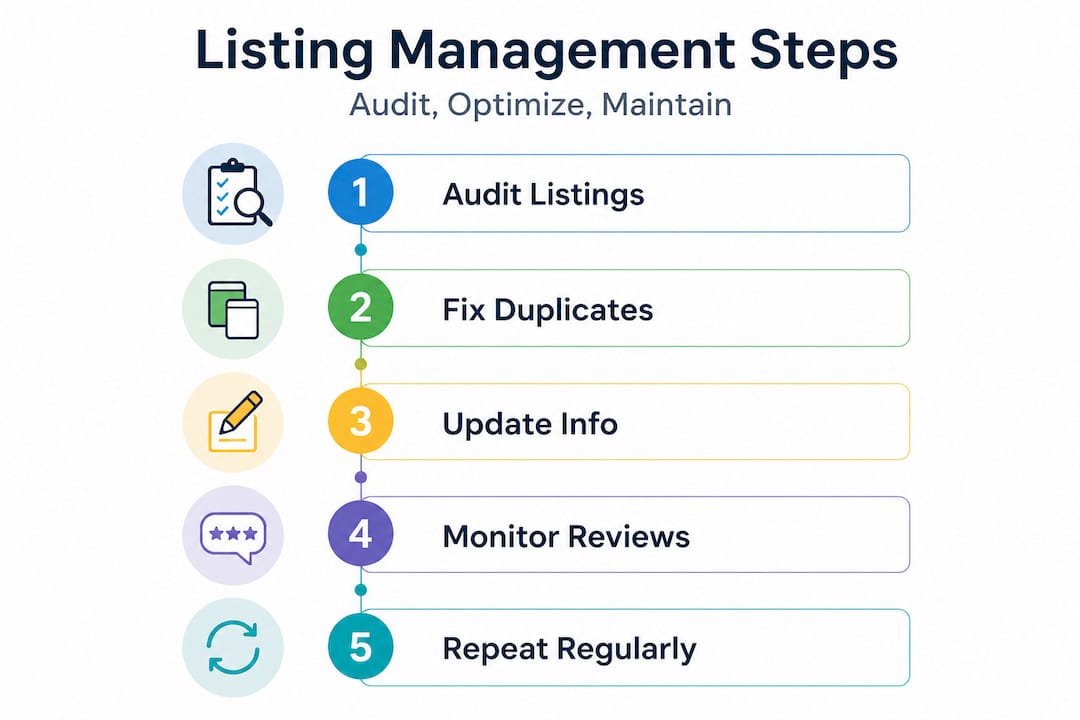
The GBP management core steps for small business owners follow a clear sequence: audit and fix NAP and duplicates, fully optimize GBP fields, keep hours and content current, and manage reviews and customer-facing assets on an ongoing basis.
Here's how to work through each phase:
-
Audit your current listings. Search Google for your business name alongside your city or zip code. Look for any profiles you did not create or have not recently verified. Check that your NAP information matches exactly across Google, Yelp, Apple Maps, Facebook, and industry directories. Even a slight variation, like "St." versus "Street," can weaken your local ranking signals.
-
Claim and verify your Google Business Profile. If you haven't already, go to Google's Business Profile Manager and claim your listing. Google will verify your ownership through a postcard, phone call, or video verification depending on your business type. Without verification, you cannot edit critical fields or respond to reviews.
-
Optimize every profile field. Fill in your business description using natural language that reflects what local customers search for. Add your correct primary and secondary categories. Upload high-quality photos of your storefront, team, and services. List all services or products you offer, including prices if applicable.
-
Set accurate hours and keep them updated. Include regular hours, special hours for holidays, and any seasonal adjustments. Texas business owners frequently deal with weather-related closures or extended summer hours. Google shows customers when you're open based on this data, and incorrect hours generate bad reviews fast.
-
Respond to every review. Google weighs review engagement as a quality signal. Responding to both positive and negative reviews shows Google and potential customers that your business is active and cares about service quality.
-
Repeat the process regularly. Local listings are not a set-it-and-forget-it task. Schedule monthly checks using calendar reminders or a simple spreadsheet tracker.
Here is a side-by-side look at your two main management approaches:
| Feature | Manual management | Automation tools |
|---|---|---|
| NAP consistency | You control every update | Pushes updates across directories |
| Duplicate detection | Requires manual searches | Some tools flag duplicates |
| Policy compliance | Full human oversight | Cannot interpret Google policies |
| Review responses | Personalized, authentic | Often templated or missed |
| Cost | Time investment | Monthly subscription fees |
| Best for | Single-location SMBs | Multi-location franchises |
Pro Tip: Automation tools like Yext or BrightLocal are helpful for pushing consistent NAP data across dozens of directories, but they cannot make judgment calls about Google's policies. Always do a manual review of your GBP at least once a month to catch issues these tools miss. You can explore more listing management tricks that work specifically for small businesses in Central Texas.
Handling duplicates and policy compliance: What every owner should know
After understanding how to audit your listings, let's zero in on handling duplicates and policy compliance, the most frequent stumbling blocks for Central Texas small and medium-sized businesses (SMBs).

Duplicate profiles suppress your visibility in a very specific way: if Google marks a profile as duplicate, it won't show on Search or Maps at all. That's not a ranking drop. That's a complete removal from local results. For a small business counting on foot traffic from Maps, this is catastrophic.
Here's what triggers a duplicate profile situation:
- Your business relocated and someone created a new profile instead of updating the old one
- A previous employee or third-party agency created a profile you never knew about
- A data aggregator (a company that distributes business data to directories automatically) pushed incorrect information that spawned additional listings
- You have a service area business listed under both a physical address and a separate virtual office
Google's duplicate-merge guidance is clear: when you move to a new location, do not create a new Business Profile. Instead, edit your existing verified profile to reflect the new address. Eligibility for merging two profiles requires that they genuinely represent the same business at the same location.
Here's a look at common policy violations and how they impact your visibility:
| Violation | Description | Impact |
|---|---|---|
| Duplicate profile | Same business listed twice | Profile suppressed or removed |
| Keyword stuffing in name | Adding city or service to business name field | Profile suspended |
| Incorrect address | Virtual office or P.O. box for non-eligible business | Reduced trust signals |
| Wrong primary category | Listing a nail salon as a spa incorrectly | Mismatched search intent |
| Unverified profile | Profile not claimed or verified | No control over edits |
What to check and correct for full compliance:
- Confirm your business name on GBP matches exactly what appears on your signage and legal registration
- Use a real, physical address unless your business is a service-area business (SAB), in which case hide your address and define your service area by city or zip code
- Remove or merge any duplicate profiles you discover through a manual search
- Never use a virtual office address or a coworking space address unless you staff that location during stated hours
"Automation can fix surface inconsistencies, but it cannot address core compliance or identity issues. Real-world resolution, including verification and manual review, is required." — ourLocalSEO
If you are weighing tools to support this work, check out the listings automation pros and cons we break down on our blog. Also, businesses offering local repair benefits and field-service-based operations face similar duplicate listing challenges, as do service businesses using AI-powered service tracking for their operations. Accurate listings are the foundation regardless of your industry.
Advanced tips for optimizing Google Business Profile and online assets
With compliance and duplication handled, you can now focus on advanced optimization to drive even stronger results.
The GBP optimization checklist from Google lays out a clear path: maintain a canonical NAP (a single, consistent version of your business name, address, and phone number), claim and verify your GBP, choose the fewest and most accurate categories, ensure address or service area precision, fill all key GBP fields, and run a repeatable schedule for review replies and photo updates.
Here is how to apply these advanced strategies in practice:
-
Choose categories carefully. Your primary category is the single most important signal to Google about what your business does. A med spa in Austin should select "Medical spa" rather than the broader "Spa" to attract the right search intent. Add secondary categories only if they genuinely describe an additional service you offer.
-
Define your service area precisely. If you are a service area business, meaning you travel to customers rather than serving them at a fixed location, hide your physical address on Google and define your service area by the specific cities or zip codes you cover. Listing all of Central Texas as your service area when you only serve Pflugerville and Round Rock dilutes your relevance for those specific searches.
-
Use attributes to add specific detail. Google lets you add attributes like "women-owned business," "veteran-led," "wheelchair accessible," or "outdoor seating." These attributes show up in your profile and can influence purchasing decisions. They also contribute to profile completeness, which Google rewards.
-
Upload new photos every month. Businesses with recent, high-quality photos get more clicks. Use real photos, not stock images. Shoot your storefront, your team at work, finished service results, and seasonal updates. Google's algorithm factors in photo recency and quantity.
-
Post Google updates regularly. GBP posts work like short social media updates directly on your profile. Use them to promote offers, announce events, or highlight seasonal services. For Texas businesses, that might mean promoting spring landscaping packages or summer HVAC maintenance specials.
-
Use special hours for Texas holidays and events. If you close for Memorial Day, extend hours for a local festival, or adjust for the Texas State Fair weekend, update your special hours in GBP. This prevents customers from showing up when you are closed and helps Google surface accurate information.
Pro Tip: Pair your GBP optimization with a well-designed, mobile-friendly website. Google's local algorithm considers your website's relevance and authority alongside your profile data. Strong website design best practices directly support your local search rankings.
The uncomfortable truth: Why automation cannot replace manual oversight
Here is the hard-won reality from managing dozens of Central Texas business listings: automation feels like the answer, but it creates a false sense of security.
Directory sync tools push your business data to dozens of platforms simultaneously. That is genuinely useful. But those tools work with structured data fields. They are designed to push what you tell them to push. If your underlying business identity has problems, like an incorrect business name, a mismatched service area, or a shadow duplicate profile you don't know about, those tools will faithfully distribute the wrong information at scale. That makes the problem worse, not better.
Google's policies on naming, duplicates, address precision, and category accuracy are rule-based. They require human interpretation and real-world action. Sending a merge request for duplicate profiles requires judgment about which profile is canonical (the primary, authoritative version), which has the stronger verification history, and which address is compliant. No automation tool makes that call.
We've seen Central Texas restaurant owners spend months wondering why their rankings dropped, only to discover an old duplicate profile from a previous owner still existed. The automation tool they were paying for had no idea the duplicate was there because it only managed the profile they pointed it at.
Our strong recommendation is this: use automation for the repeatable, low-risk tasks like NAP consistency across directories and scheduled photo uploads. But schedule a real human review of your GBP and duplicate status at least once a month. Check the real-world compliance pitfalls we document from our experience in the Central Texas market. The monthly time investment is small. The cost of ignoring it can be months of lost visibility.
Ready to boost your local visibility?
Managing local listings with precision takes time and expertise, especially when you are also running a business. At ourLocalSEO, we help small business owners across Central Texas take control of their Google Business Profiles, fix duplicates, maintain NAP consistency, and build the kind of local search presence that drives real foot traffic.

Whether you are starting from scratch or trying to clean up years of listing inconsistencies, our trusted local SEO services are built for businesses like yours. Explore our comprehensive local SEO guide to understand every layer of the local search process. And if your website needs to catch up with your listings, our website optimization support team is ready to help. Let's get your business found by the customers searching for you right now.
Frequently asked questions
How can I fix a duplicate Google Business Profile for my business?
Verify the profiles represent the same business at the same location, then use Google's official merge process rather than creating a new profile. Creating a new profile without resolving the duplicate will make the problem worse.
What happens if my Google Business Profile is marked as a duplicate?
A profile flagged as duplicate will not appear on Google Search or Maps until the issue is resolved. This means customers searching for your business in the local map pack simply won't find you.
How often should I update my Google Business Profile information?
Maintaining key GBP fields like hours, categories, photos, and review responses is a best practice you should follow at minimum once a month, or immediately whenever your business information changes.
Can automation tools fully handle Google's policy risks for business listings?
Automation tools require human oversight because Google's policy issues tied to duplicates, address accuracy, and category compliance cannot be resolved by software alone. Use tools to support your process, not replace your judgment.