

Most small business owners in Central Texas assume SEO is all about ranking number one on Google. But rankings alone don't pay the bills. SEO reporting is the process of collecting, analyzing, and presenting data on SEO performance to demonstrate value, track progress, and inform strategy adjustments. When done right, it connects your marketing spend to real customer actions like phone calls, direction requests, and website visits that turn into sales. This guide breaks down what SEO reporting is, which metrics matter most for local businesses, what a great report looks like, and which tools you can start using today without breaking your budget.
Table of Contents
- What is SEO reporting and why does it matter?
- Essential SEO KPIs for local Central Texas businesses
- What makes a great SEO report?
- SEO reporting tools and tips for Central Texas business owners
- The real value of SEO reporting: What most local businesses miss
- Get expert help with your SEO reporting
- Frequently asked questions
Key Takeaways
| Point | Details |
|---|---|
| Focus on local actions | Track metrics that show how customers interact with your business, not just your site traffic. |
| Keep reports simple | Clear, audience-focused reporting makes SEO insights easier to act on. |
| Use free tools first | Start your SEO reporting with Google’s free tools and scale up as you grow. |
| Take action monthly | Review your SEO reports each month to quickly adjust and improve results. |
What is SEO reporting and why does it matter?
Now that you see the common confusion around SEO reporting, let's clarify what it actually means and why it's so important for local businesses.
At its core, SEO reporting means tracking, analyzing, and sharing data about how your website and Google Business Profile (GBP) perform in search results. It's not just a stack of numbers. A good report tells a story: what's working, what's not, and what to do next.
"SEO reporting connects your marketing activity to real business outcomes. Without it, you're spending money on a strategy you can't measure or defend."
For small businesses in Pflugerville, Austin, Round Rock, and across Central Texas, this matters because your marketing budget is limited. Every dollar needs to count. Reporting shows you whether your investment is actually bringing customers through the door or just generating clicks that go nowhere.
Here's what strong SEO reporting does for your business:
- Proves ROI by linking your SEO spend to local customer actions like calls and direction requests
- Replaces guesswork with data so you stop wasting money on tactics that don't work
- Highlights opportunities you might miss, like a page that almost ranks or a GBP category that drives more calls
- Builds accountability so you or your agency can show clear progress over time
- Guides budget decisions by showing which locations, services, or keywords drive the most value
The biggest mistake we see local business owners make is chasing vanity metrics. Getting 5,000 impressions sounds exciting until you realize none of those searchers were in Cedar Park looking for your service. Good reports move past the noise and focus on what actually drives revenue.
Pro Tip: Always tie your data back to business outcomes. Ask yourself, "How did our changes this month affect calls coming in from Google?" That one question will keep your reporting focused on what matters.
Essential SEO KPIs for local Central Texas businesses
With the important role of SEO reporting established, the next step is knowing which numbers actually matter for Central Texas businesses.
Local SEO KPIs are different from what a national brand tracks. You're not trying to rank in Seattle. You're trying to show up when someone in Manor or Georgetown searches for exactly what you offer.
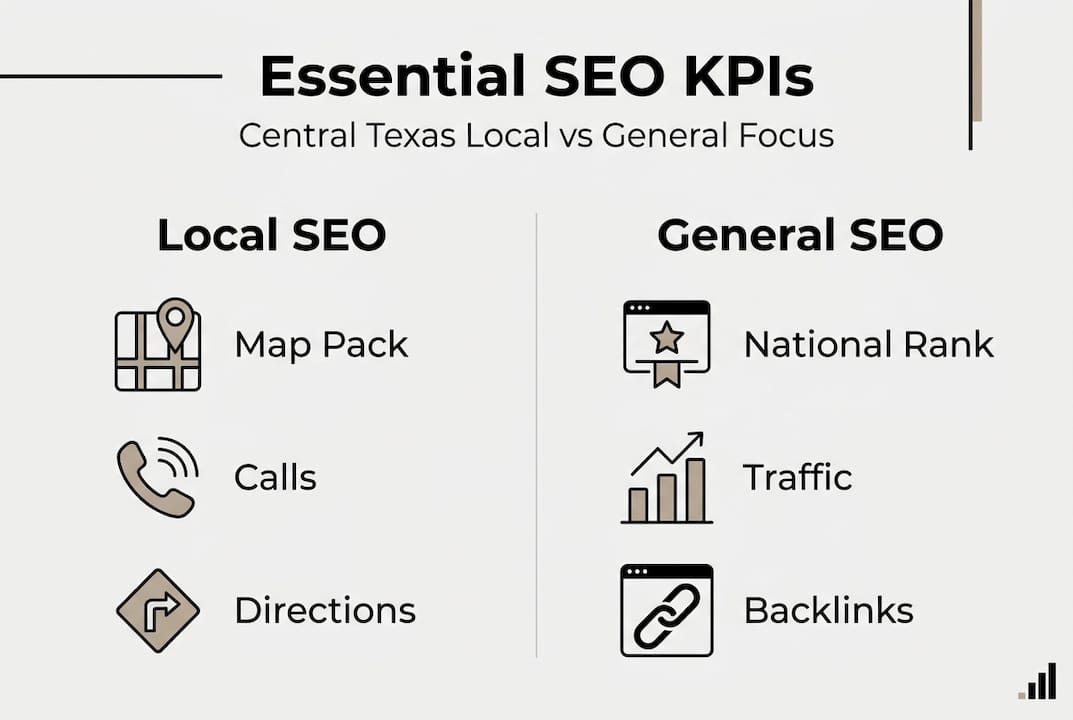
Here's a comparison of KPIs for local SEO versus general SEO:
| Metric | Local SEO focus | General SEO focus |
|---|---|---|
| Rankings | Local map pack position | National keyword position |
| Traffic | Geo-targeted sessions | Total organic sessions |
| GBP actions | Calls, directions, messages | Not applicable |
| Conversions | Phone calls, form fills | E-commerce sales, signups |
| Backlinks | Local citations and directories | High-authority domains |
| Technical health | Mobile speed, NAP consistency | Site architecture, crawlability |
For most Central Texas businesses, the core SEO metrics to track include organic traffic, impressions, clicks, click-through rate (CTR), average position, conversions, bounce rate, technical health, and backlinks. But for local businesses, you should prioritize local pack rankings, direction requests, and phone calls from your GBP above almost everything else.
Here's what to track every month:
- GBP calls and direction requests: Direct signals that people found you and want to visit
- Local map pack rankings: Are you showing up in the top 3 for your key services?
- Organic traffic from your city or region: Are the right people landing on your site?
- CTR from search results: Are your titles and descriptions compelling enough to earn the click?
- Website conversions: Form submissions, calls tracked through your site, appointment bookings
If you're running SEO for Pflugerville businesses or anywhere nearby, these local-focused metrics will tell you far more than a broad traffic number ever will. And if you want to understand how ranking on Google Maps factors into your reporting, that's a key layer to add as your strategy matures.
Pro Tip: For most Central Texas businesses, 20 highly relevant calls from local searchers beat 500 random site visitors every single time. Quality over quantity is the rule in local SEO.
What makes a great SEO report?
Knowing what to measure is vital, but it's just as important to present your findings in a way that drives action. Here's how to build a useful, actionable SEO report.

A great SEO report is clear, actionable, and built for its audience. A nail salon owner in Pflugerville doesn't need a 40-page technical audit. She needs to know if more customers found her this month and what to do differently next month. Tailoring reports by audience is critical: executives and owners want an ROI summary, while technical team members need details on issues fixed and tasks completed. Avoid data overload and always focus on business outcomes over raw rankings.
Here's what every local business SEO report should include:
- Executive summary: A plain-language overview of what happened this month, whether things improved, and the one or two biggest wins or concerns.
- KPI dashboard: A visual snapshot of your most important metrics, traffic, calls, GBP actions, rankings, all in one place.
- Traffic and conversion breakdown: Where your visitors came from, which pages they landed on, and how many took action.
- Technical health update: A quick note on any site issues found and fixed, page speed, mobile usability, or broken links.
- Action items for next month: Specific, prioritized tasks based on what the data shows, not just a generic to-do list.
Visual elements matter more than most people realize. A simple bar chart showing month-over-month call growth from your GBP is far more persuasive than a table full of numbers. Use visuals to make your data easy to act on.
Here's a sample structure for a monthly report:
| Report section | What it shows | Why it matters |
|---|---|---|
| Executive summary | Overall performance snapshot | Quick decision-making |
| KPI dashboard | Key metrics at a glance | Tracks progress toward goals |
| Traffic analysis | Source, volume, and quality | Identifies what's driving visits |
| GBP performance | Calls, directions, views | Measures local customer actions |
| Action items | Next steps based on data | Keeps strategy moving forward |
You can see how this kind of structure plays out in practice by reviewing real client SEO results from businesses we've worked with across Central Texas.
Pro Tip: For your monthly owner review, highlight one thing to stop, one thing to start, and one thing to continue. That simple framework turns a report into a real action plan.
SEO reporting tools and tips for Central Texas business owners
Finally, you don't need a big-company budget to start building effective SEO reports. Here's how to get it done realistically in Central Texas.
The good news is that the two most powerful SEO reporting tools available are completely free. SEO reporting drives local engagement by linking metrics to customer actions like calls and directions, proving ROI to secure budgets, and you can do all of this using free tools like Google Search Console (GSC) and Google Analytics 4 (GA4) before spending a single dollar on paid software.
Here's a breakdown of tools and their best uses:
- Google Search Console (GSC): Tracks impressions, clicks, CTR, and average position for your website. Shows which search queries bring visitors to your site. Free and essential.
- Google Analytics 4 (GA4): Monitors traffic sources, user behavior, and conversions on your website. Pairs perfectly with GSC for a full picture.
- Google Business Profile Insights: Built into your GBP dashboard. Shows calls, direction requests, photo views, and search queries directly from your profile.
- Ubersuggest: Affordable paid tool for tracking keyword rankings and competitor comparisons. Good for businesses ready to go deeper.
- Moz Local: Helps manage and track local citations and directory listings across the web. Useful for businesses in multiple locations.
- Looker Studio (formerly Google Data Studio): Free tool to build visual dashboards by connecting GSC, GA4, and other data sources in one place.
For businesses focused on SEO in Round Rock or tracking Manor business SEO success, starting with GSC and GA4 gives you everything you need to measure local performance without paying for tools you won't fully use.
Best practices for your reporting workflow:
- Set a fixed monthly review date and stick to it
- Automate data pulls using Looker Studio so reports build themselves
- Compare month-over-month AND year-over-year to account for seasonal trends
- Share reports with your team or agency so everyone works from the same data
Pro Tip: Start with GSC and GA4. Add paid tools only when you've outgrown what the free options can show you. Most local businesses never need to go beyond that stack.
The real value of SEO reporting: What most local businesses miss
Even with all the tools and KPIs available, it's easy to miss the true business power behind good SEO reporting.
Here's what we've seen after working with small businesses across Central Texas: most owners check their rankings once in a while and call it done. But rankings are just one signal. The real gold is in the customer action data sitting inside your GBP and GA4 that almost nobody looks at consistently.
When you review your data through a customer-action lens, you start finding unexpected growth levers. A single page update on a slow-ranking service page can double your call volume in 60 days. A new batch of reviews can push your GBP into the local map pack for a high-intent keyword you weren't even targeting. These wins don't show up if you're only watching rankings.
Most of your local competitors are not doing this. They're either ignoring reporting entirely or drowning in data they don't know how to use. Consistent, well-targeted reporting gives you a real competitive edge because you're making decisions based on what customers actually do, not what you think they want.
Our local SEO guide goes deeper on how to turn these insights into a repeatable growth strategy. The businesses that win in local search are the ones that treat reporting as a monthly business habit, not an afterthought.
Get expert help with your SEO reporting
If you're ready to turn local SEO insights into real customer engagement, partnering with experts can help you make sense and money from your marketing data.

At ourLocalSEO, we build transparent, action-focused reports that show exactly how your SEO investment is performing. No jargon, no vanity metrics, just clear data tied to real business results. Whether you need Local SEO Pflugerville support, help with SEO services in Georgetown, or a full strategy paired with website design solutions, we tailor every plan to your location and goals. Let's make your reporting work as hard as you do.
Frequently asked questions
What is SEO reporting in simple terms?
SEO reporting means tracking and sharing how your website appears, performs, and brings in customers from Google and other search engines. Think of it as your monthly scorecard for online visibility.
Which SEO metrics should Central Texas businesses focus on?
Local pack rankings, Google Business Profile calls and direction requests, and quality website traffic from your city or region matter most. Prioritize local pack rankings, direction requests, and phone calls from your GBP above broad traffic numbers.
Do I need paid tools for good SEO reporting?
No. Free tools like GSC/GA4 cover most reporting needs for local business owners. Add paid tools only when your strategy grows beyond what the free options can handle.
How often should I review my SEO reports?
Monthly reviews are ideal. Checking in every 30 days lets you catch trends early and make adjustments before small issues grow into bigger problems.
What if I don't see results right away?
SEO takes time. Look for steady growth in calls, direction requests, and relevant website visits over several months rather than expecting overnight changes.