

Business listings are the digital storefronts that determine whether local customers find you or your competitor when they search on Google, Apple Maps, or Yelp. Knowing how to create business listings correctly, and maintain them over time, is the single most direct path to appearing in the local map pack and converting nearby searches into real customers. Platforms like Google Business Profile, Bing Places, and Yelp are free to use, yet most small business owners either skip the setup entirely or leave critical fields incomplete. This guide walks you through every step, from claiming existing profiles to verifying ownership and optimizing your listing for ongoing local SEO success.
How to create business listings: what you need to know first
Creating a business listing, also called a business citation in local SEO, means placing your business's name, address, phone number, and key details on a public directory or platform so search engines can surface you to nearby customers. The industry term "citation building" covers this process across multiple directories. Google Business Profile is free and designed specifically to convert local searches into customers by connecting your phone number, hours, photos, and posts directly to Google Search and Maps.
The most important thing to understand before you start: the process is not just about creating a new profile. It is about claiming, verifying, and optimizing. Skipping any one of those three steps leaves your listing incomplete, unverified, or vulnerable to edits by third parties. Small business owners in competitive markets like Austin, Round Rock, and Pflugerville cannot afford that exposure.
Why claim existing listings before creating new ones?
Many business owners assume they need to build a listing from scratch. The reality is that listings are often auto-created from customer reviews, third-party data aggregators, or map providers before you ever log in. That means your business may already have a profile on Google, Yelp, or Bing with outdated or incorrect information that you do not control.
Claiming existing profiles before creating new ones prevents duplicate listings, which actively hurt your local SEO rankings. Search engines treat duplicate entries as a signal of unreliable data, which reduces your chances of appearing in the local map pack. Here is how to search for and claim existing listings across the major platforms:
- Google Business Profile: Go to business.google.com and search your business name. If a profile appears, select "Claim this business" and follow the verification steps.
- Yelp: Search your business on biz.yelp.com. If a listing exists, click "Claim this business" and verify via phone or email.
- Bing Places: Visit bingplaces.com, search your business, and import your Google Business Profile data if available. This saves significant setup time.
- Apple Maps: Use the Apple Business Connect portal to search for and claim your listing.
- Facebook: Search your business name on Facebook and look for an existing page before creating a new one.
Pro Tip: Before touching any platform, Google your business name along with your city. The results will show you which listings already exist, so you can prioritize which ones to claim first rather than wasting time building duplicates.
Understanding why claiming your listing matters goes beyond just ownership. It gives you control over the information customers see, the ability to respond to reviews, and the power to post updates that keep your profile active.
What information do you need to set up a business listing?
Accurate, complete data is the foundation of every effective listing. Listing accuracy forms the foundation for local SEO, and optimizing photos, categories, and posts only works after your core information is validated. Gather the following before you start filling out any platform:
- Business name: Use your exact legal or operating name. Do not add keywords or location modifiers to your name field. Google penalizes keyword stuffing in business names.
- Address: Use the same format consistently across every platform. If your address is "Suite 200," never abbreviate it as "Ste 200" on one platform and spell it out on another.
- Phone number: Use a local phone number, not a toll-free number. Local numbers reinforce geographic relevance.
- Website URL: Link to your homepage or a specific location page if you have multiple locations.
- Business category: Choose the most specific primary category available. Choosing the right business categories directly impacts which local searches trigger your listing.
- Business hours: Include regular hours, holiday hours, and special hours. Outdated hours are one of the top reasons customers leave negative reviews.
- Business description: Write a 250 to 750 character description that explains what you do, who you serve, and where you are located. Include your city name naturally.
- Photos and videos: Google recommends at least 720x720 pixels in JPG or PNG format for photos. High-quality images increase engagement and signal an active, trustworthy profile.
| Information Type | Why It Matters |
|---|---|
| NAP (Name, Address, Phone) | Consistency across platforms builds search engine trust and improves rankings |
| Business category | Determines which searches trigger your listing in the local map pack |
| Photos | Increases click-through rates and signals an active, credible profile |
| Business hours | Prevents customer frustration and reduces negative reviews from wrong information |
| Business description | Gives search engines and customers context about your services and location |
Pro Tip: Prepare a master data sheet with your exact business name, address, phone, website, hours, and a ready-to-paste description before you start. This reduces manual entry errors and makes listing on multiple platforms significantly faster.
How to claim, verify, and set up your Google Business Profile
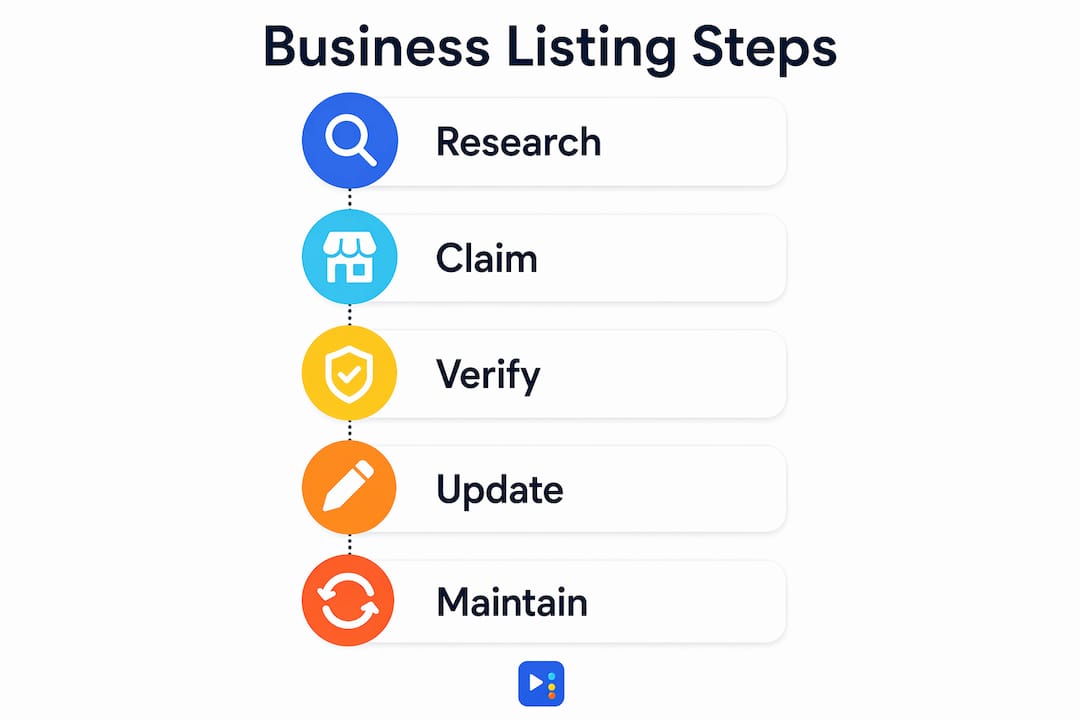
Google Business Profile is the single most important listing for any local business. It powers your appearance in Google Search, Google Maps, and the local map pack. Here is the step-by-step process:
- Go to business.google.com and sign in with a Google account you own and control.
- Search for your business name. If it appears, select it and choose "Claim this business." If it does not appear, select "Add your business to Google."
- Enter your business name, category, and address. If you serve customers at their location rather than at a storefront, select the service area option instead of a physical address.
- Add your phone number and website URL.
- Select your verification method. Verification methods vary by business and region and include phone, email, postcard, and video. Choose the fastest option available to you. Video verification is increasingly common and typically resolves within a few days.
- Complete verification promptly. An unverified profile cannot be fully managed and will not rank as effectively.
Once verified, your post-verification work determines how well your profile performs:
- Add all business hours, including holiday hours.
- Upload at least five photos covering your storefront, interior, team, and products or services.
- Write a complete business description using natural language that includes your city and service type.
- Select secondary categories that reflect additional services you offer.
- Enable messaging so customers can contact you directly from your profile.
- Post an update at least once every two weeks to signal an active profile to Google.
For Texas-based businesses, Yourlocalseo has a dedicated Google Business Profile verification guide that covers state-specific considerations and common verification issues.
How to maintain listings across multiple platforms for ongoing local SEO
Setting up your listings is the start, not the finish. NAP consistency across all listings is critical for search engine trust and ranking. Even small discrepancies in formatting, like "St." versus "Street," can cause ranking drops across platforms.
Treat your Google Business Profile as the canonical source of truth for your NAP data. When you update your address, phone number, or hours on Google, replicate those exact changes across Yelp, Bing Places, Apple Maps, Facebook, and any industry-specific directories you use. This outward propagation of consistent data is what citation building is all about.
Maintenance tasks to build into your calendar:
- Quarterly NAP audits: Audit your business information at least several times per year and immediately after any business change such as a move, phone number update, or rebrand.
- Seasonal hours updates: Update holiday hours at least two weeks before major holidays. Google allows you to set special hours in advance.
- Photo refreshes: Add new photos quarterly. Profiles with recent photos consistently outperform those with stale imagery.
- Review responses: Respond to every review, positive or negative, within 48 hours. Active review management signals credibility to both Google and potential customers.
Pro Tip: Set a recurring calendar reminder every 90 days to log into each platform and verify that your NAP data still matches your Google Business Profile exactly. This takes less than 30 minutes and prevents the slow ranking erosion that comes from unnoticed inconsistencies.
Avoiding common local SEO mistakes during maintenance is just as important as the initial setup. Neglected listings with outdated information are one of the most common reasons small businesses lose ground in local search over time.
Key takeaways
Effective business listings require consistent NAP data, verified ownership, and regular maintenance across Google Business Profile, Yelp, Bing Places, and Apple Maps to rank in local search and convert nearby customers.
| Point | Details |
|---|---|
| Claim before you create | Search every platform for existing listings before building new ones to avoid duplicates. |
| NAP consistency is non-negotiable | Use identical name, address, and phone formatting across every directory and citation platform. |
| Google Business Profile comes first | Treat it as your canonical data source and replicate its information outward to all other platforms. |
| Verification unlocks full control | Complete verification promptly on every platform to manage your listing and improve rankings. |
| Maintenance drives long-term results | Conduct quarterly audits, refresh photos, and respond to reviews to sustain local visibility. |
What I've learned after managing hundreds of local listings
After working with nail salons, med spas, restaurants, and service businesses across Central Texas, the pattern I see most often is this: business owners spend hours building a beautiful Google Business Profile and then never touch it again. Six months later, they wonder why a competitor with a simpler website is outranking them.
The uncomfortable truth is that Google rewards activity. A profile that gets new photos, regular posts, and consistent review responses will outperform a perfectly optimized but dormant profile almost every time. I have seen businesses in competitive Austin zip codes climb from page two to the local map pack in under 90 days simply by committing to a weekly posting schedule and responding to every review.
The other mistake I see constantly is treating all platforms equally. Yelp matters for restaurants and personal care businesses. Bing Places matters for businesses serving older demographics. But Google Business Profile is where the majority of local search volume lives, and it deserves the majority of your attention. Start there, get it right, and then expand outward.
One more thing: do not let the verification process intimidate you. Video verification feels awkward the first time, but it is faster than waiting for a postcard and more reliable than phone verification for businesses in new locations. Walk through your space, show your signage, and submit. It is usually approved within 72 hours.
— Tran
Let Yourlocalseo handle your listing setup and optimization

Building and maintaining business listings across Google, Yelp, Bing Places, Apple Maps, and dozens of industry directories takes time that most small business owners simply do not have. Yourlocalseo specializes in local SEO services for small businesses across Pflugerville, Austin, Round Rock, Georgetown, Cedar Park, and surrounding Central Texas communities. We handle Google Business Profile setup and verification, NAP audits, citation building, and ongoing listing management so you can focus on running your business. Every strategy we build is tied to your specific location and market, not a generic template. If you are ready to get found by more local customers, visit Yourlocalseo to see how we can help.
FAQ
What is a business listing in local SEO?
A business listing, also called a citation, is a public mention of your business's name, address, and phone number on a directory or platform like Google Business Profile, Yelp, or Bing Places. Search engines use these listings to verify your business's legitimacy and determine local search rankings.
How long does it take to verify a Google Business Profile?
Verification time depends on the method chosen. Phone and email verification typically complete within minutes, while postcard verification can take up to 14 days. Video verification usually resolves within 72 hours and is the most reliable option for new business locations.
How many business listings should a small business have?
A small business should be listed on at least the four major platforms: Google Business Profile, Yelp, Bing Places, and Apple Maps. Beyond those, prioritize industry-specific directories and local chamber of commerce listings relevant to your market.
Why does NAP consistency matter for business listings?
NAP inconsistencies across platforms confuse search engines and reduce trust in your business data, which directly lowers your local search rankings. Even minor formatting differences like "Ave" versus "Avenue" can create discrepancies that hurt visibility.
Can I manage multiple business listings from one place?
Google Business Profile supports multiple locations under one account. For managing listings across different platforms simultaneously, tools like Moz Local or Yext allow centralized updates, though manual verification is still required on most platforms when you first claim a listing.