

The website design process for local business is defined as a structured sequence of phases covering strategy, information architecture, visual design, development, local SEO integration, testing, and launch. Skipping or reordering any phase costs you time and money. At Yourlocalseo, we work with nail salons, med spas, restaurants, and service businesses across Pflugerville, Austin, Round Rock, and Central Texas, and the pattern is consistent: owners who follow a clear process get sites that rank and convert. Those who rush straight to design end up rebuilding within a year. This guide gives you the exact workflow to get it right the first time, with local SEO baked in from the start.
What are the essential phases of the website design process for local businesses?
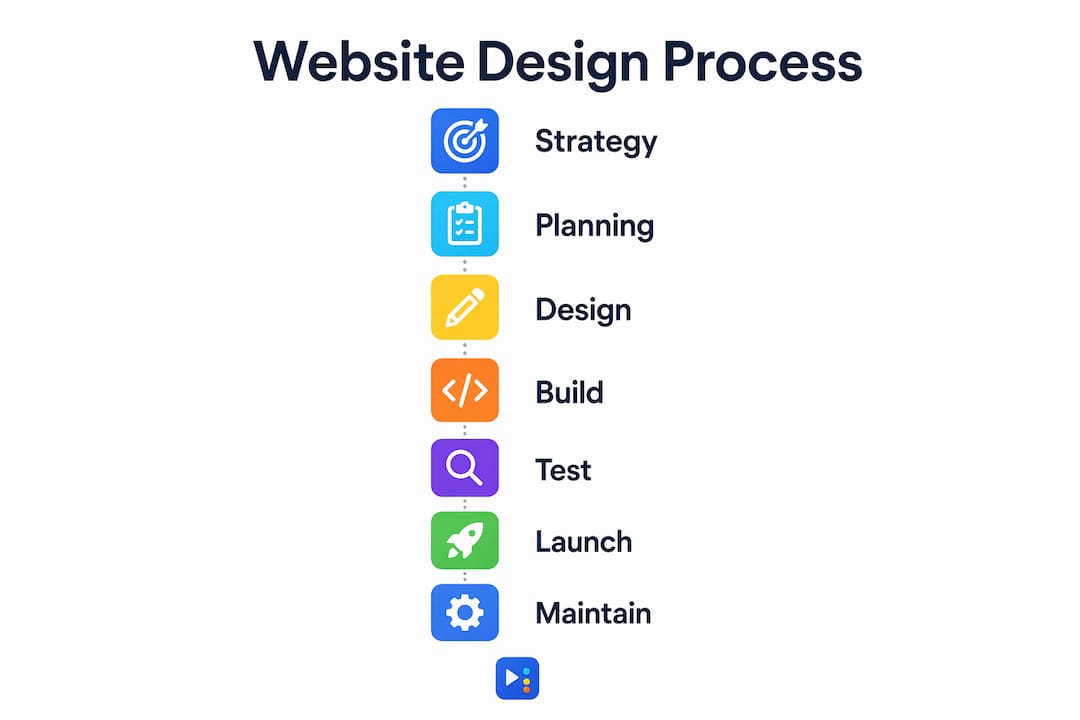
A well-structured design process involves seven distinct sequential phases, and compressing or reordering them is almost always a false economy. Here is the sequence that works:
- Strategy and discovery. Define your business goals, target customers, and the specific actions you want visitors to take. A nail salon in Cedar Park has different conversion goals than a plumbing company in Georgetown.
- Information architecture. Map out your pages, user flows, and navigation hierarchy before any visual work begins. This is your sitemap.
- Wireframing. Sketch low-fidelity page layouts showing where headlines, CTAs, images, and forms will live. No colors, no fonts yet.
- Visual design. Apply your brand colors, typography, and imagery to the wireframes. This is where your site starts to look like your business.
- Development. Build the site on a CMS like WordPress or Squarespace, connect your hosting, and code the design into a working product.
- SEO setup and content integration. Add meta titles, descriptions, schema markup, Google Business Profile alignment, and finalized copy.
- Testing and launch. Run QA across devices, fix issues, and go live with a documented launch checklist.
Skipping strategy and content planning is the single most common mistake we see. Owners jump to visual design without knowing what pages they need or what their customers are actually searching for. The result is a site that looks fine but does nothing for local search rankings.
Pro Tip: Write your homepage headline and your top three service descriptions before you hire a designer. Content decisions should drive layout decisions, not the other way around.

How to plan your local website's structure and navigation for user clarity and local SEO
Starting with a wireframed sitemap before any visual UI work is the single highest-ROI step in the entire local website design process. It prevents expensive structural fixes after development is complete. For most local businesses, the core sitemap includes: Home, Services (with individual subpages per service), About, Contact, and a Blog or Resources section for ongoing SEO content.
Navigation design is not just a visual decision. Consistent main navigation across every page is required under WCAG Level AA accessibility standards, meaning your menu order and placement must stay the same throughout the site. Users who land on an interior page from Google need to orient themselves immediately. Reshuffling your nav between pages breaks that orientation and drives people away.
Here is a comparison of the most common navigation approaches and their impact on usability and SEO:
| Navigation type | User experience impact | SEO impact |
|---|---|---|
| Top horizontal menu | Fast scanning, familiar pattern, works well on desktop | Strong internal linking, crawlable by Google |
| Hamburger menu (mobile) | Saves space, but hides options behind a tap | Neutral if implemented correctly with accessible markup |
| Mega menu | Good for sites with many services or locations | Risk of over-linking; can dilute page authority if misused |
| Footer navigation | Useful for secondary pages like Privacy Policy | Minimal SEO value but supports crawlability |
| Sticky header nav | Keeps CTAs visible on scroll, improves conversions | No direct SEO benefit, but reduces bounce rate |
Poor navigation is a conversion problem, not just a UX issue. When your "Book Now" or "Get a Quote" page is buried two clicks deep, you lose customers who were ready to act. For local businesses, the Contact or Booking page should always be one click from anywhere on the site.
NAP consistency is the other non-negotiable in this phase. Your business name, address, and phone number on your website must match your Google Business Profile exactly. Even minor differences like "St." versus "Street" send conflicting signals to Google and hurt your local map pack rankings.
Pro Tip: Place your NAP in the footer of every page, not just the Contact page. Google crawls footers on every visit and uses that data to verify your local signals.
What practical steps should local businesses take for content and visual design?
Content decisions made early directly shape page layouts and conversion effectiveness. Copy length, headline structure, and the presence of social proof like reviews and before/after photos all influence how a page should be designed. If you wait until after design to write your content, you will be rewriting your design too.
For local businesses, content hierarchy follows a simple rule: lead with what the customer needs to know, then support it with proof. Your homepage should open with a clear statement of what you do, who you serve, and where you are located. A med spa in Round Rock should not open with a generic tagline. It should open with something like "Botox and skin treatments for Round Rock and Pflugerville residents, with same-week appointments available."
Visual design for local businesses should follow these principles:
- Establish a design system early. Lock in your brand colors, two to three fonts, and button styles before building any page. Consistency builds trust with local customers who visit multiple times.
- Prioritize mobile layout. Mobile visitors are often ready to act, and slow or confusing mobile experiences lose customers fast. Design for a 390px screen width first, then scale up to desktop.
- Use click-to-call buttons. For any service business, a tappable phone number in the header and on every service page is a direct revenue driver. Do not make mobile users copy and paste your number.
- Add sticky CTAs on mobile. A fixed "Call Now" or "Book Online" bar at the bottom of the mobile screen keeps your conversion action visible without interrupting the reading experience.
- Include local imagery. Stock photos of generic offices or smiling strangers do not build trust with local customers. Photos of your actual location, team, and work convert better.
For mobile SEO best practices specific to Central Texas businesses, the fundamentals are fast load times, compressed images, and no intrusive pop-ups that block content on small screens.
Pro Tip: Run your homepage through Google PageSpeed Insights before launch. A score below 70 on mobile will cost you rankings and customers. Compress images with a tool like Squoosh or ShortPixel before uploading.
How to build, test, and launch a local business website that performs from day one
Development starts with two decisions: your CMS and your hosting. WordPress powers a large share of small business websites and gives you the most flexibility for local SEO plugins like Yoast SEO or Rank Math. Squarespace and Wix are faster to launch but limit your technical SEO options. For most local businesses in competitive markets like Austin or Round Rock, WordPress on a managed host like WP Engine or SiteGround is the right call.
Before launch, run through this QA checklist:
- Test every page on iPhone Safari, Android Chrome, and desktop Chrome and Firefox.
- Submit all contact forms and confirm they deliver to the correct inbox.
- Check all images for alt text and compressed file sizes.
- Verify that your NAP in the footer matches your Google Business Profile exactly.
- Install an SSL certificate and confirm all pages load over HTTPS.
- Set up Google Search Console and submit your XML sitemap.
- Add LocalBusiness schema markup to your homepage and Contact page.
- Test page load speed on mobile using Google PageSpeed Insights.
Local SEO setup at launch includes more than just meta tags. Add location-specific schema markup to signal your service area to Google. Build citations on directories like Yelp, Bing Places, and Apple Maps with the same NAP you used on your site. If you serve multiple neighborhoods, consider local landing pages for each area to capture hyper-local search traffic.
Launch is the beginning of ongoing website management, not the finish line. Most post-launch failures come from missing redirects, untrained content teams, or owners who assume the site will maintain itself. Set a monthly calendar reminder to check your Google Search Console for crawl errors, update your service pages seasonally, and add new customer reviews to your site.
Common post-launch tasks to schedule monthly:
- Review Google Search Console for crawl errors and manual actions.
- Check that your Google Business Profile and website NAP still match.
- Add at least one new blog post or service update for fresh content signals.
- Monitor your local SEO audit checklist to catch ranking drops early.
Key takeaways
A successful website design process for local business requires strategy, NAP consistency, mobile-first design, and ongoing post-launch management to drive real local leads.
| Point | Details |
|---|---|
| Follow the full seven-phase process | Skipping strategy or content planning leads to costly rebuilds and weak local rankings. |
| NAP consistency is non-negotiable | Your name, address, and phone must match your Google Business Profile exactly on every page. |
| Design for mobile first | Mobile visitors are ready to act; slow or confusing mobile layouts lose customers before they convert. |
| Content drives design decisions | Write your core copy before wireframing so layouts reflect real content needs, not placeholders. |
| Launch starts the work, not ends it | Monthly audits, content updates, and citation checks keep your site competitive after go-live. |
What I've learned from building local business sites in Central Texas
After working with businesses across Pflugerville, Austin, and Round Rock, the clearest pattern I see is this: owners underestimate how much strategic clarity at the start determines everything downstream. The businesses that come to us with a defined service list, a clear geographic focus, and at least a rough idea of their top customer questions get better sites faster and at lower cost. The ones who say "just make it look nice" spend twice as much fixing it later.
The second thing I tell every client is to stop treating their website as a project with a finish line. A nail salon that launched a beautiful site in 2023 and never touched it again is now invisible in local search because competitors kept adding content, earning reviews, and building citations. Your website is infrastructure, like your lease or your equipment. It requires regular attention.
One more thing most articles will not tell you: your navigation is your conversion architecture. I have seen businesses with genuinely great services lose leads because their "Book Now" button was hidden in a dropdown. Poor navigation directly kills conversions, and fixing it costs almost nothing compared to rebuilding a site from scratch. Audit your navigation before you audit anything else.
If you are a local service business trying to compete in a market like Austin or Cedar Park, the local SEO mistakes that hurt rankings most are almost always tied to the website design phase, not the marketing phase. Get the foundation right, and the rest of your SEO work compounds faster.
— Tran
Ready to build a local business website that actually ranks?
At Yourlocalseo, we handle the full website design and local SEO process for small businesses across Central Texas. From sitemap planning and wireframing to Google Business Profile alignment, schema markup, and citation building, every site we build is designed to drive real leads from local search.

We work with nail salons, med spas, restaurants, and service businesses in Pflugerville, Round Rock, Georgetown, Cedar Park, and Austin. If you want a site that shows up when local customers search for what you offer, we are ready to help. Visit Yourlocalseo to see how we approach local SEO for service businesses and request a free consultation today.
FAQ
What is the website design process for a local business?
The website design process for a local business is a seven-phase workflow covering strategy, information architecture, wireframing, visual design, development, SEO setup, and launch. Each phase builds on the previous one, and skipping any phase typically results in costly rework.
How long does it take to design a local business website?
A properly executed local business website typically takes four to eight weeks from strategy to launch, depending on the number of pages and how quickly content is provided. Rushing the process by skipping wireframing or content planning adds time, not saves it.
Why does NAP consistency matter for my website?
NAP consistency, meaning your business name, address, and phone number matching exactly across your website and Google Business Profile, is one of the strongest local ranking signals Google uses. Even small discrepancies like "Ave" versus "Avenue" can suppress your local map pack visibility.
Do I need separate pages for each service I offer?
Yes. Individual service pages allow Google to rank your business for specific searches like "gel nails Pflugerville" or "HVAC repair Round Rock" rather than just your homepage. Each page should target one service and one location for maximum local SEO impact.
What CMS should a local business use for their website?
WordPress is the most flexible option for local businesses that want full control over SEO, with plugins like Yoast SEO and Rank Math supporting local schema and on-page optimization. Squarespace and Wix work for simpler sites but limit technical SEO capabilities in competitive local markets.